
Tripo 3D (H3.1) Online
Example 3D models to explore
Example models for illustration. Hover or tap a card to spin it in 3D.
What Tripo H3.1 output looks like
Sample results published by fal.ai and by Tripo AI, each linked to where it came from. None of these were made on Kairo3D.
 Official sample

Bonsai tree from one photo
fal.ai's own example run of the Tripo H3.1 image-to-3D endpoint: the preview render the API returned for this bonsai photo. The trunk twist and the pot rim survive the trip into 3D.
Example on fal.ai (image to 3D)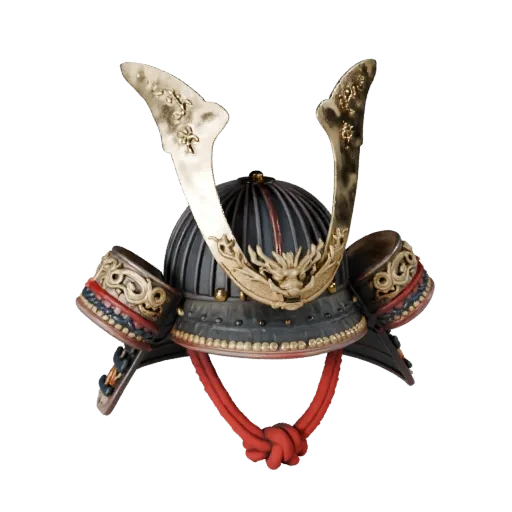 Official sample
Samurai helmet from a prompt
fal.ai's example run of the Tripo H3.1 text-to-3D endpoint. One sentence gave the helmet its crest, dragon ornament and red cord, all as texture on a single mesh.
Prompt: “a japanese samurai kabuto helmet with gold dragon ornament and red cord lacing”
Example on fal.ai (text to 3D)Mammoth warrior figurine
Turntable clip from Tripo's high-detail model page, showing the back and sides that the model had to infer.
Showcase on tripo3d.ai Official sample

Ornate horned skull
From Tripo's H3.1 showcase: concept art in, a textured model out. Tripo's showcase models may use its high-detail settings, which this page does not run.
Showcase on tripo3d.ai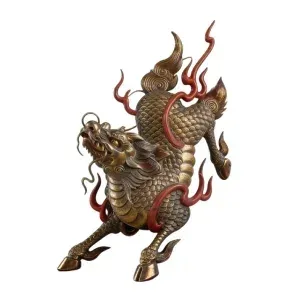 Official sample
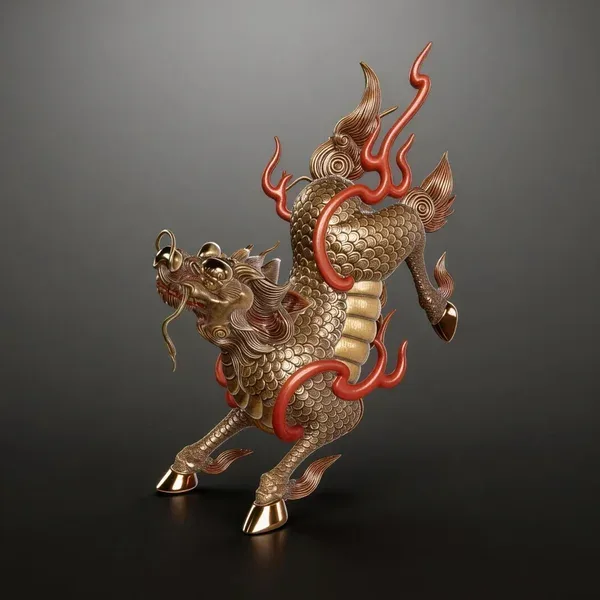
Bronze qilin statue
Another Tripo showcase piece: scales, flame curls and hooves carried over from a single render. Fine, thin parts like these are where a single view is hardest.
Showcase on tripo3d.ai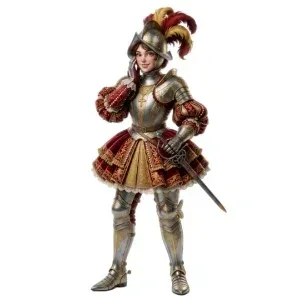 Official sample
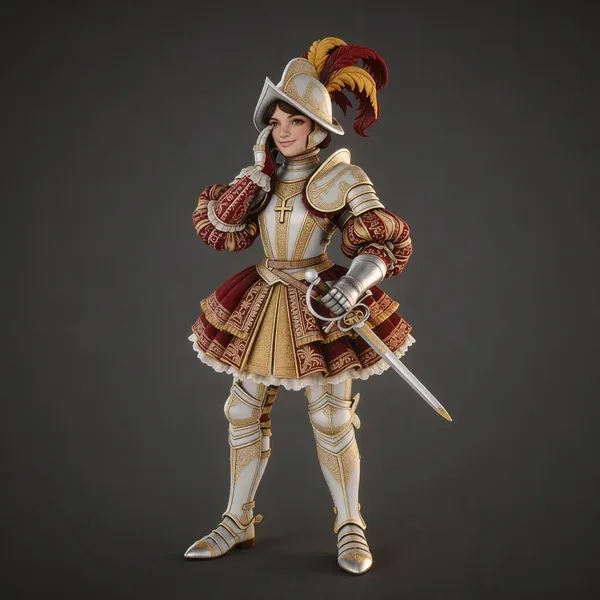
Armoured character
A full-body character from Tripo's showcase. The pose stays as in the picture; rigging it for animation is a separate step Tripo offers on its own platform.
Showcase on tripo3d.aiTripo H3.1 on Kairo3D, at a glance
The numbers below come from the settings this site actually runs, not from Tripo's own studio.
- 2ways in: one photo or a prompt of up to 1,024 characters
- 120 / 80credits per image / per prompt, refunded if a run fails
- ~1 mintypical time per model, upload to download
Tripo 3D and the H3.1 model, explained
Who makes Tripo, what H3.1 is, and which of its settings this page uses.
What is Tripo 3D?
Tripo 3D (often searched as Tripo AI or Tripo3D) is a family of AI models that turn an image or a sentence into a 3D mesh. H3.1 is the one Tripo markets as its High Detail model: Tripo says it produces dense, high-poly geometry suited to hero assets, rendering and 3D printing. On Kairo3D it runs with standard geometry, standard textures and PBR materials switched on.
Who made it, and when
Tripo is built by Tripo AI, the 3D product of VAST, whose research team publishes open 3D work such as TripoSG and TripoSplat. Tripo H3.1 is available on Tripo's own studio and as a partner endpoint on fal.ai. Kairo3D calls fal.ai's tripo3d/h3.1 image-to-3D and text-to-3D endpoints; it is not Tripo's official site.
What it's good at
Characters, collectibles, props and ornate objects where you want both a believable shape and a colour texture. It also writes a usable model from a prompt alone, which is why it is the default text-to-3D engine on Kairo3D: describe one object with its material and colour, and you get a textured first draft.
Limits to know
This page runs H3.1 with fal's standard geometry and texture options, so do not expect the two-million-polygon showcase meshes from Tripo's site. The output is a triangle mesh (no quads), and rigging, animation, part splitting and retopology stay on Tripo's own platform. Each model takes about a minute, and hidden sides are guessed from a single view.
Official sources
- Tripo AI official site
- Tripo H3.1 high-detail model page
- VAST AI Research
- fal.ai: Tripo H3.1 image to 3D
- fal.ai: Tripo H3.1 text to 3D
Kairo3D is an independent service that runs Tripo 3D through fal.ai. Not affiliated with Tripo AI or VAST.
How to use Tripo 3D online
From one photo to a downloadable 3D model in four steps — all in your browser.
Upload a photo or write a prompt
Drop in a JPG, PNG or WebP up to 10 MB, or switch to Text and describe one object, such as "a brass pocket watch with an open lid". Tripo reads up to 1,024 characters.
Generate with Tripo 3D
It's already selected. Press Generate — it typically takes about a minute, and you can keep browsing while it runs.
Preview it in 3D
The finished model opens in the 3D viewer. Rotate it, check the texture and the back side, and run it again or try another engine if needed.
Download GLB, STL or OBJ
Save the textured GLB, or convert it to STL, OBJ or PLY in your browser. Every model stays in My creations until you delete it.
Why run Tripo 3D on Kairo3D
The same model without the setup — plus the things a self-hosted install doesn't give you.
No GPU, no install
Tripo H3.1 is a hosted model, not something you install. Here it runs on fal.ai's servers, so a laptop, tablet or phone browser is enough, and you don't need a Tripo subscription.
Pay per model, in credits
Each generation costs 120 credits from one balance that works with every engine. No separate plan per model.
Preview in 3D first
Spin, zoom and inspect the textured result in the built-in 3D viewer as soon as it finishes, then decide whether to keep it.
Export GLB, STL or OBJ
Download the textured GLB, or convert it in your browser to STL, OBJ or PLY for slicers, 3D printing and other 3D tools.
Switch engines anytime
Not happy with a result? Run the same photo through TRELLIS, TRELLIS 2, Hunyuan 3D 3.1 Pro, Rodin Gen-2.5 Fast, and Pixal3D — same account, same credits.
Failed runs are refunded
If a generation fails, the credits go back to your balance automatically. Your files stay private in My creations.
Tripo 3D vs the other engines
Every engine on Kairo3D draws from the same credits. Pick one per generation — here's what each takes and costs.
| Engine | Made by | Input | Licence | ||
|---|---|---|---|---|---|
| TRELLISMicrosoft | Microsoft | InputImage | Credits per model8 | Typical time~30 s | LicenceMIT |
| TRELLIS 2Microsoft | Microsoft | InputImage | Credits per model120 | Typical time~1 min | LicenceMIT |
| Tripo H3.1This pageTripo AI | Tripo AI | InputImageText | Credits per model120 image · 80 text | Typical time~1 min | LicenceCommercial API (Tripo AI terms) |
| Hunyuan 3D 3.1 ProTencent | Tencent | InputImageText | Credits per model150 | Typical time~2 min | LicenceTencent Hunyuan 3D licence (check territory terms) |
| Rodin Gen-2.5 FastHyper3D (Deemos) | Hyper3D (Deemos) | InputImageText | Credits per model40 | Typical time~30 s | LicenceCommercial API (Hyper3D terms) |
| Pixal3DTencentARC | TencentARC | InputImage | Credits per model120 | Typical time~90 s | LicenceMIT |
Credits are charged per generation and refunded automatically if a run fails. Times are typical, not guaranteed.
Tripo 3D FAQ
Straight answers about running it online.
More engines and tools
Compare models, or jump straight to the job you need done.
Rodin AI
Hyper3D Rodin Gen-2.5 Fast: cheaper, faster drafts from an image or prompt.
Text to 3D
Write a prompt and compare text-capable engines, Tripo included.
Meshy vs Tripo
Features, pricing and exports of Meshy and Tripo, side by side.
Hunyuan 3D
Tencent's Hunyuan 3D 3.1 Pro, the other image-and-text engine here.
Tripo vs Rodin
Tripo H3.1 vs Rodin Gen-2.5 Fast on the same photo: mesh, textures, time and credits.
Tripo alternative
Six AI 3D engines on one account, Tripo H3.1 included, compared with Tripo Studio row by row.
Tripo vs Hunyuan 3D
Tripo H3.1 vs Hunyuan 3D 3.1 Pro: mesh detail, speed, credits and Tencent's licence terms.
Image to 3D
Pick any engine and turn a photo into a textured 3D model.
Run Tripo 3D on your own photo or idea
One photo or one sentence in, a textured Tripo H3.1 model out in about a minute. Export GLB, STL or OBJ; failed runs are refunded.